

Creating a digital product, like a website or an application, requires a deep understanding of user experience. However, crafting an effective UX isn’t always straightforward. Even seasoned designers can fall into common UX mistakes that hinder usability and satisfaction.
Here, you’ll learn what UX mistakes to avoid to deliver a smoother, more user-friendly experience.
Key Takeaways:
- User research is essential to understand real needs and behaviors, so always prioritize the user.
- Functionality comes first, so ensure your UX design supports the core function, like fast loading times and smooth interactions.
- Design efficient navigation. Help users move through your product easily by using clear labels, intuitive guidance, and well-placed call-to-actions.
10 Common UX Mistakes to Avoid
Making a well-performing UX design is challenging. Therefore, you should stay away from these errors for better UX performance.
1. Not Performing User Research Properly
User satisfaction should always be your top priority. That’s why solid user research is so important. It helps ensure your design solves real user needs. Without it, you risk building something that misses the mark.
Invest time in understanding your audience, even when making small design changes. You may use a user persona to identify your target audience and determine their interests.
Also Read: 7 Visual Hierarchy in Web Design That Instantly Boosts UX!
2. Striking for Aesthetic Purpose Only
This is one of the common UX mistakes. Don’t assume that more features or decoration automatically mean more value. A design doesn’t need to be overly decorative or overloaded, especially if the core functionality isn’t performing well.
Always prioritize a user-friendly experience. Make sure users can complete tasks easily and intuitively. Review the product’s functionality both before and after adding new features to ensure everything still works smoothly.
3. Having a Poor Navigation Structure

Never assume that users are already familiar with your product. Compromising on navigation can confuse users and make them leave your website or application.
Make sure your navigation is clear and intuitive. Use descriptive labels, organize content into logical categories, and maintain consistency across all pages to help users find what they need.
4. Providing Users with Too Many Options

This one may seem subtle, but it’s one of the common UX mistakes. Sometimes, we try to offer users various options, thinking that more choices will increase the chance of a purchase. However, it can have the opposite effect. Too many options can lead to decision fatigue, known as the paradox of choice.
To avoid this, highlight the best options for users. Featuring bestsellers or customer favorites can guide decisions more effectively. Additionally, incorporating personalization based on user behavior can help deliver more relevant choices.
Also Read: 2025 Sustainable Web Design Trend Digital Design to Know
5. Having an Inconsistent Visual Hierarchy
Visual hierarchy is significant in helping users understand and prioritize content. Without a clear hierarchy, users may struggle to navigate your app or website. This confusion can lead to frustration and drop-offs.
To avoid this, establish a strong visual structure in your UX design. Use scale, color contrast, typography, and white space strategically to guide users through the content.
6. Underestimating UX Writing
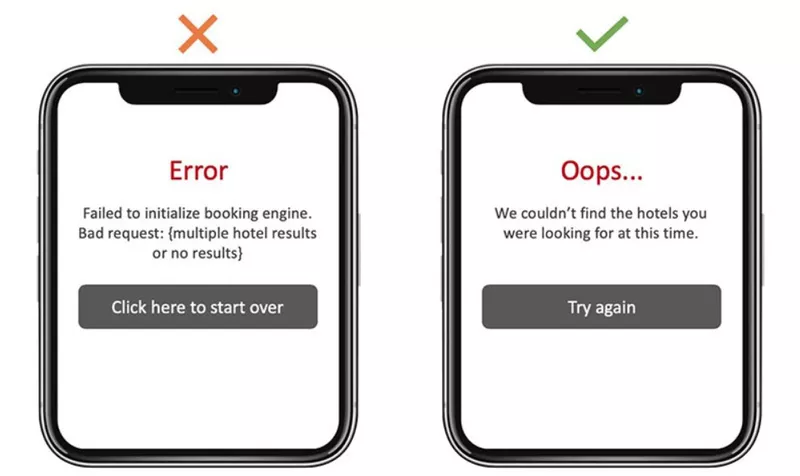
Neglecting UX writing is one of the common UX mistakes. Microcopy, like button labels, error messages, and tooltips, guides users through your product. If it’s unclear or inconsistent, it can confuse users and disrupt their journey.
Always write with clarity and purpose. Whether it’s a call-to-action or form instruction, make sure the language is simple, readable, and aligned with your design.
7. Failing to Establish Responsive Design
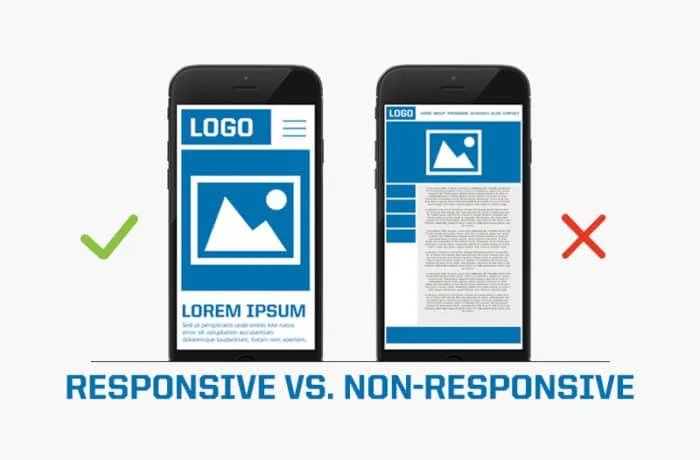
With over 6.84 billion smartphone users and more than 94% of internet activity happening on mobile devices, responsive design is essential. Failing to design for mobile is one of the biggest UX mistakes today.
Ensure your website or application adapts seamlessly to all screen sizes. Use larger touch targets, sufficient spacing, and responsive layouts. Optimize images and scripts to reduce load times across devices.
Also Read: 12 Tricks How to Make a Website Look More Professional
8. Not Optimizing Forms
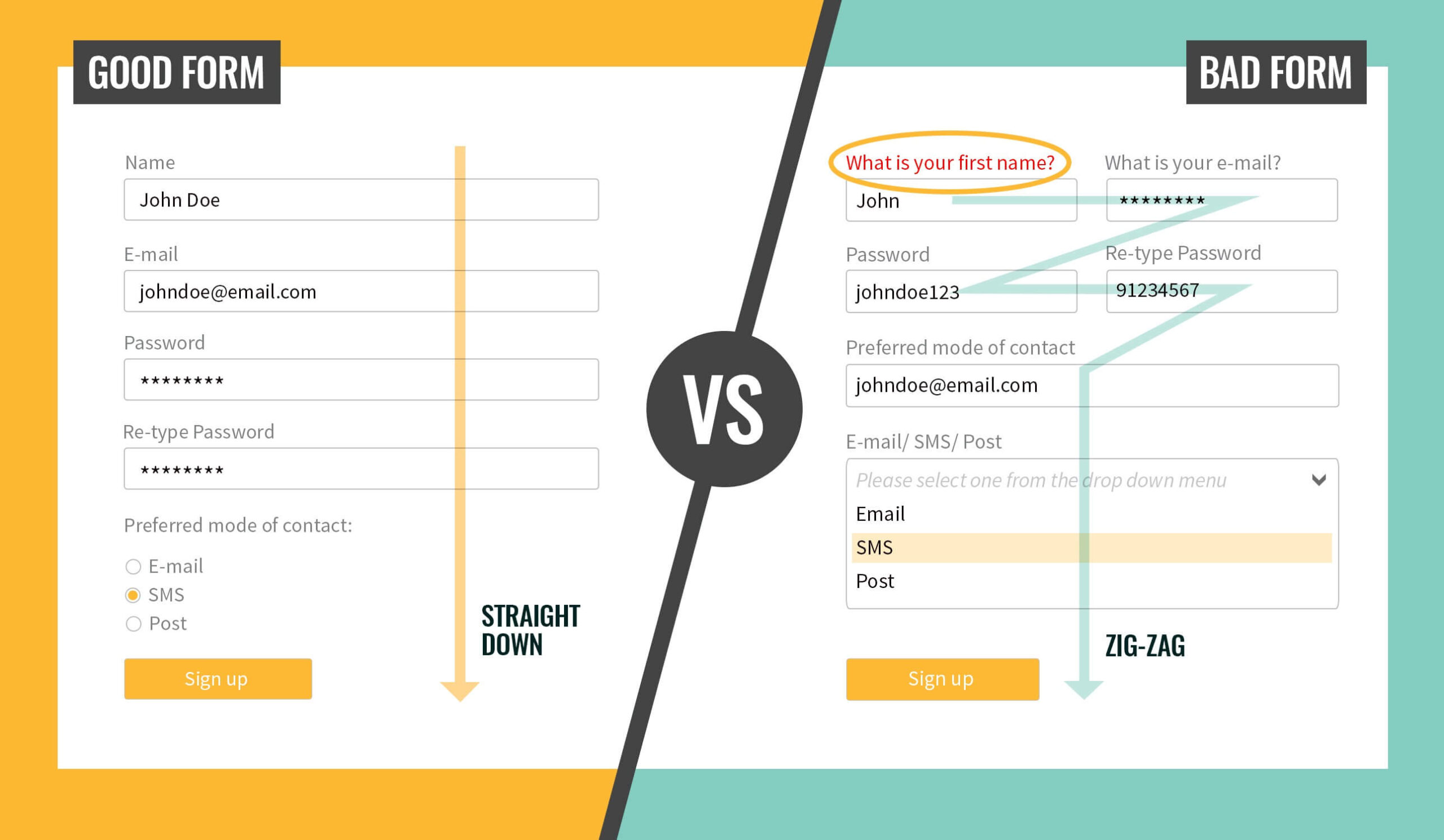
Long, complicated forms are a major source of user frustration. Poorly designed forms can interrupt the user journey and lead to high abandonment rates, making this one of the common UX mistakes.
Simplify your forms by asking only essential questions. Enable features like autofill, real-time validation, and progress indicators. Clear instructions and CTAs will guide users through the process smoothly.
9. Improper Use of Images and Videos
Images and videos can enhance your design, but if used incorrectly, they can slow down performance or distract users. Media elements should support your message, not overshadow it. Use high-quality visuals that are optimized for fast loading. Avoid placing large images or auto-playing videos in prominent areas that might interfere with navigation or readability.
10. Overly Relying on Trends
Trendy design elements like dark mode, 3D effects, or virtual reality can be exciting, but blindly following trends is one of the more subtle yet impactful UX design mistakes. Overreliance on trends can make your design inconsistent and dilute your brand identity.
Instead of chasing every new trend, choose those that align with your product’s purpose and user expectations. Adopt trends thoughtfully to enhance your design.
Also Read: 10 Common UI Design Mistakes and How to Revive Them
Build Better Experiences by Avoiding Common UX Mistakes!
Understanding and avoiding these common UX mistakes is essential for creating products that truly serve users. By focusing on usability, clarity, and consistency, you can enhance the overall experience and build lasting user trust.If you want to improve your UX design, start with improving UX writing, and that begins with choosing the right fonts. At Rantautype Studio, you’ll find typefaces for UX design that are legible and visually appealing. Elevate your design with our affordable fonts with versatile licensing options to suit your project needs.